
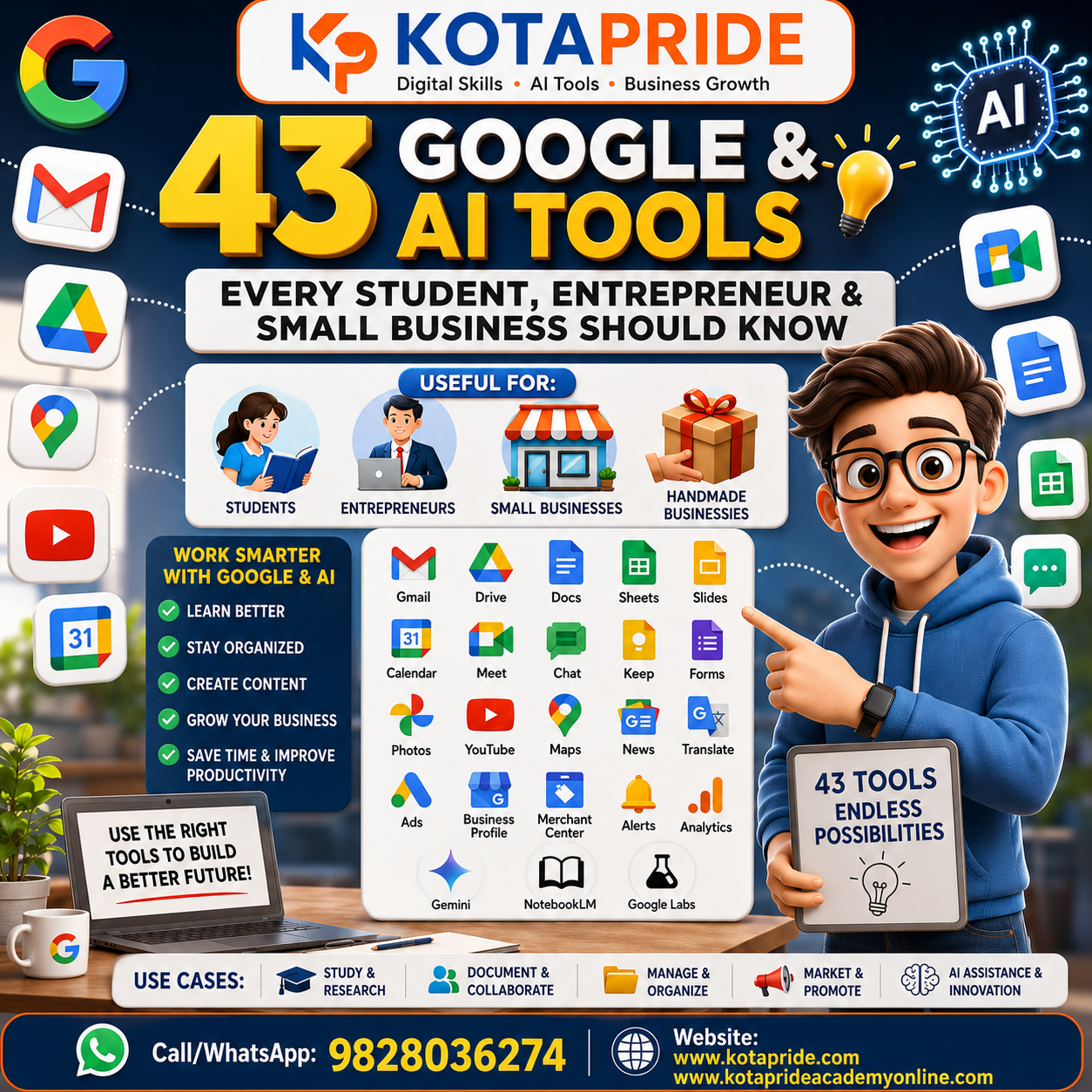

43 Google & AI Tools That Students, Entrepreneurs and Small Businesses Should Know
Today, digital tools are no longer limited to large companies or technology professionals. Students, entrepreneurs, small business owners, handmade product sellers, professionals and home-based businesses can also use digital tools to learn, communicate, organize information, promote products and build an online presence.
Google offers a wide range of tools covering search, communication, productivity, education, business, marketing, cloud storage, content creation and AI.
In this guide, we explore 43 useful Google and AI-related tools and understand how they can be useful in everyday life, education and business.
1. Google Account
A Google Account provides access to many Google services from one account.
Students can use it for Gmail, Drive, Docs, YouTube and other services, while businesses can use it to manage different Google-based digital activities.
Useful for: Students, professionals, entrepreneurs and businesses.
2. Google Search
Google Search is one of the most commonly used tools for finding information online.
Students can research study topics, while business owners can research competitors, products, customers, markets and industry information.
Business use: Market research, competitor research, product research and information discovery.
3. Google Contacts
Google Contacts helps users save and manage contact information.
For a business owner, maintaining customer, supplier and professional contacts in an organized way can be useful for regular communication.
4. Google Business Profile
Google Business Profile is an important digital presence tool for businesses.
A business can provide information such as its business name, location, contact details, website, services, photos and other information that can appear on Google Search and Maps.
Useful for:
Local businesses, shops, manufacturers, service providers, coaching institutes, restaurants, professionals and small businesses.
5. Google Maps
Google Maps helps users find places, businesses, addresses and directions.
For businesses, being discoverable through Maps can help potential customers find their location and business information.
Example: A handmade jewellery business with a physical studio can make it easier for nearby customers to discover the business.
6. YouTube
YouTube is a video platform where users can watch, create, upload and share videos.
Students can use it for educational learning, while businesses can create educational, product-related or informational content.
Business opportunities include:
- Product education
- Tutorials
- Customer education
- Brand awareness
- Business information
7. Google Play Store
Google Play Store allows Android users to discover, download and update applications and other digital content.
Students and business owners can use relevant apps to support their daily digital activities.
8. Gmail
Gmail is Google’s email service.
Students can use Gmail for education and communication, while entrepreneurs can use professional email communication for customers, suppliers, enquiries and business relationships.
Business use:
Customer communication, enquiry management, document sharing and professional correspondence.
9. Google Drive
Google Drive provides cloud storage for digital files.
A small business can use it to organize:
- Product photographs
- Documents
- Price lists
- Business presentations
- Marketing material
- Customer-related files
It can also make file sharing and collaboration easier.
10. Google Gemini
Google Gemini is an AI assistant that can support users with tasks such as writing, brainstorming, learning, summarization and information-related activities.
For Students
Students can use AI to:
- Understand difficult concepts
- Generate study questions
- Summarize information
- Brainstorm project ideas
For Businesses
Entrepreneurs can use AI for:
- Content ideas
- Marketing brainstorming
- Business communication
- Drafting content
- Research assistance
AI output should still be reviewed for accuracy and relevance before being used professionally.
11. Google Calendar
Google Calendar helps users manage events, meetings, appointments and schedules.
For entrepreneurs and small business owners, it can help organize:
- Customer meetings
- Team meetings
- Follow-ups
- Important business dates
- Appointments
12. Google News
Google News helps users discover news and updates from different sources.
Students can use it for current affairs and research, while business owners can follow industry developments, markets and business-related news.
13. Google Photos
Google Photos can help users manage and organize photos and videos.
For a handmade product business, organized product photography is particularly useful for maintaining a digital product collection and preparing content for online promotion.
14. Google Meet
Google Meet can be used for online meetings, classes, discussions and communication.
It can be useful for:
- Online classes
- Client meetings
- Business discussions
- Team communication
- Training sessions
15. Google Translate
Google Translate helps users translate content between languages.
This can be useful for students learning languages and businesses communicating with customers or audiences who use different languages.
For example, a handmade product seller targeting customers outside their region may use translation as an initial communication aid.
16. Google Vids
Google Vids is designed for creating and editing video-based business content.
It can be useful for:
- Presentations
- Internal communication
- Educational content
- Business storytelling
17. Google Sheets
Google Sheets is a spreadsheet tool useful for managing and analyzing information.
A small business can use Sheets for:
- Product lists
- Customer records
- Sales tracking
- Expense tracking
- Inventory information
- Marketing data
For students, it can also be useful for assignments, calculations and data analysis.
18. Google Docs
Google Docs allows users to create and edit online documents.
Students can use it for:
- Assignments
- Notes
- Projects
- Research documents
Businesses can use it for:
- Business proposals
- Content writing
- Reports
- Meeting notes
- Business documentation
19. Google Slides
Google Slides is useful for creating presentations.
Entrepreneurs can use presentations for:
- Business proposals
- Product presentations
- Training
- Client meetings
- Business ideas
Students can use it for academic projects and presentations.
20. Google One
Google One provides additional cloud storage and other benefits for supported Google services.
For users who manage large amounts of documents, photographs and digital files, additional storage can be useful.
21. Google Shopping
Google Shopping helps users discover products and compare available products, prices and sellers.
For product-based businesses, it can be one part of the broader online product discovery ecosystem.
Useful for: Handmade products, fashion, lifestyle products, retail products and other product businesses.
22. Google Store
Google Store is Google’s online store for Google hardware and related products, depending on the market.
It is mainly useful for people researching or purchasing supported Google products.
23. Google Finance
Google Finance provides financial and market-related information.
Students can use it to learn about financial markets, while entrepreneurs can monitor relevant market and company information.
24. Google Keep
Google Keep is a simple tool for creating and organizing notes, ideas and reminders.
An entrepreneur can quickly note:
- Business ideas
- Customer requirements
- Content ideas
- Product ideas
- Meeting points
- Follow-up reminders
25. My Ad Center
My Ad Center allows users to manage certain Google advertising preferences.
Understanding advertising preferences can also help students and marketers learn more about how personalized advertising experiences work.
26. Google Classroom
Google Classroom is designed for teaching and learning activities.
Teachers and students can use it for:
- Classes
- Assignments
- Study material
- Announcements
- Submissions
It can be particularly useful for digital education and online learning environments.
27. Google Chat
Google Chat supports text-based communication and collaboration.
Businesses can use suitable communication tools to coordinate with teams and manage day-to-day discussions.
28. Google Earth
Google Earth allows users to explore different locations through maps, satellite imagery and 3D experiences.
Student Use
It can make geography and location-based learning more interactive.
Business Use
It can help users understand locations, geography and different regions when conducting general research.
29. Google Saved
Google Saved allows users to save useful content discovered through Google.
A student can save useful research resources, while a business owner can save useful websites, places or other information for future reference.
30. Google Arts & Culture
Google Arts & Culture provides access to artworks, cultural collections, museums and historical information.
Students can use it as a learning and exploration resource, particularly for subjects related to art, culture and history.
31. Google Ads
Google Ads is Google’s online advertising platform.
Businesses can use advertising campaigns to promote products and services and reach audiences through Google’s advertising ecosystem.
Example
A handmade candle business could use online advertising to promote its products to relevant audiences and direct interested users toward its website or other business destination.
32. Google Merchant Center
Google Merchant Center helps businesses manage product information for Google’s shopping-related experiences.
This can be relevant to businesses that sell physical products online.
Examples
- Handmade products
- Clothing
- Jewellery
- Home décor
- Lifestyle products
- Retail products
Accurate product information, images and pricing are important for product visibility.
33. Google Travel
Google Travel provides tools and information that can help users research and plan trips.
Students, professionals and entrepreneurs can use travel-related digital tools when planning journeys for education, work or business purposes.
34. Google Learn
Google’s learning resources can help users explore different topics and develop knowledge and skills.
For students and beginners, digital learning resources can be useful for continuous learning beyond traditional classrooms.
35. Google Books
Google Books helps users search and discover books and book-related information.
Students can use it for:
- Finding books
- Exploring subjects
- Research
- Discovering educational resources
36. Chrome Web Store
Chrome Web Store provides browser extensions and themes for Google Chrome.
Extensions can add different functionalities to the browser and support various workflows.
For example, students, marketers and professionals can use relevant extensions for productivity and research.
37. Google Password Manager
Google Password Manager helps users manage saved passwords and supported passkeys.
Good password management is an important part of digital safety.
Students and business owners should avoid using weak or repeated passwords across important accounts.
38. Google Alerts
Google Alerts can notify users when new online content related to selected topics becomes available.
Business Use
A business owner can monitor topics related to:
- Industry
- Brand
- Products
- Competitors
- Market developments
Student Use
Students can monitor topics related to their studies and research interests.
39. Google Blogger
Blogger is Google’s blogging platform.
A student can use a blog to practice writing and publishing, while an entrepreneur can use blogging as part of a broader content strategy.
Business Blogging Can Help With:
- Educational content
- Product information
- Customer questions
- Industry information
- Brand communication
40. YouTube Music
YouTube Music is a music streaming service for discovering and listening to music.
It is primarily a personal entertainment and music discovery platform.
41. Google Wallet
Google Wallet can be used to store supported payment cards, passes, tickets and other digital items.
Available features depend on factors such as country, device and supported services.
AI Tools for Students & Businesses
42. NotebookLM
NotebookLM is an AI-powered research and learning tool developed by Google.
It can work with provided sources such as notes and documents to help users understand and explore their material.
Student Uses
Students can use NotebookLM to:
- Understand study material
- Summarize provided documents
- Ask questions about their material
- Organize learning
- Explore important information from their sources
Business Uses
Entrepreneurs and small business owners can also use document-based AI workflows for:
- Understanding business documents
- Researching provided information
- Summarizing reports
- Organizing knowledge
- Developing content ideas
Educational Content
If a student or content creator wants to create an educational video, NotebookLM can assist in understanding the provided source material and developing ideas or supporting content.
43. Google Labs
Google Labs is a place where users can explore Google’s experimental products, technologies and AI experiences.
The available experiments and features can change over time.
Useful For:
- Exploring new AI technologies
- Creative experimentation
- Content creation
- Learning about emerging digital tools
- Exploring new ideas and workflows
For students, it can be an interesting way to understand how new AI technologies are being developed and applied.
For entrepreneurs and creators, experimental AI tools can provide ideas for new digital workflows.
How Students Can Use These Tools
Students do not need to learn all 43 tools at once. They can start with tools that support their daily learning.
Useful Student Workflow
Google Search → Research
Google Docs → Notes & Assignments
Google Drive → File Storage
Google Sheets → Data & Records
Google Slides → Presentations
Google Classroom → Online Learning
Google Meet → Online Classes
NotebookLM → Study Material & Research
Gemini → AI-Assisted Learning & Ideas
This combination can create a practical digital learning environment.
How Small Businesses Can Use These Tools
A small business does not necessarily need a large technology team to start using digital tools.
For example, a handmade product business can build a basic digital workflow:
Google Business Profile
→ Business visibility
Google Maps
→ Location discovery
Google Photos
→ Product photos
Google Drive
→ File organization
Google Sheets
→ Product & business records
Google Docs
→ Business documents
YouTube
→ Educational & product content
Google Ads
→ Paid promotion
Google Merchant Center
→ Product information
Google Analytics/other measurement tools
→ Understanding website performance
AI Tools
→ Ideas, research, content assistance and productivity
How Entrepreneurs Can Use Google & AI Tools
Entrepreneurs can combine different tools according to their business requirements.
For example:
Research → Google Search
Business Presence → Google Business Profile
Communication → Gmail / Google Meet / Google Chat
Documentation → Google Docs
Data Management → Google Sheets
Storage → Google Drive
Content → YouTube / Blogger
Advertising → Google Ads
Product Discovery → Google Shopping / Merchant Center
AI Assistance → Gemini / NotebookLM
The objective is not to use every available tool. The objective is to select the tools that solve a real business, learning or productivity problem.
Google & AI Tools for Handmade Product Businesses
Handmade businesses often start small, sometimes from home or with limited resources. Digital tools can help organize and promote such businesses.
For example, a handmade jewellery, handicraft, candle, pottery, décor or textile business can use:
For Online Presence
Google Business Profile and Google Maps
For Product Information
Google Photos, Docs and Drive
For Product Records
Google Sheets
For Content
YouTube and Blogger
For Product Discovery
Google Shopping and Merchant Center
For Advertising
Google Ads
For AI Assistance
Gemini and NotebookLM
This creates a basic digital ecosystem around the business.
Why Digital Tools Matter for Small Businesses
Digital transformation is not only for large companies.
A small business can gradually build its digital foundation through:
Digital Identity → Online Presence → Content → Customer Discovery → Communication → Enquiries → Business Growth
The right combination of Google and AI tools can help a business organize its digital activities and make technology a practical part of everyday operations.
Final Thoughts
Google and AI tools can support different stages of learning, productivity, communication, marketing and business development.
For students, these tools can support research, learning, documentation and presentations.
For entrepreneurs, they can support research, communication, content and business operations.
For small and handmade product businesses, they can help establish an online presence, organize product information, communicate with customers and explore digital marketing opportunities.
The most important step is to learn these tools practically and use them according to your actual requirements rather than simply collecting a long list of tools.
Digital skills are becoming an important part of modern education and business. Learning how to use the right digital and AI tools can help students, entrepreneurs and small businesses work more efficiently and participate more effectively in the digital world.